Free Rider
EMBED CODE
GAME URL
Game Introduction
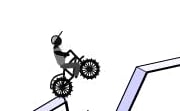
Embark on an exhilarating journey with Free Rider, a one-of-a-kind driving game that offers a world of endless creativity and excitement! This free-to-experience game allows you to step into a realm where you become the master of your own track. You'll have the freedom to draw a track using a pencil, creating hills, jumps, and all sorts of challenges for your stickman rider. It's not just about riding; it's about designing an adventure that will test your skills and creativity. Interact with other players' tracks and see how they've pushed the boundaries of imagination. Whether you're a budding artist or a thrill-seeking gamer, Free Rider has something for everyone. Dive into this unique gaming experience and let your creativity soar as you free ride through your custom-made tracks!
How to Play
Getting started is easy and costs nothing! In Free Rider, you can draw your track by simply left-clicking and dragging the mouse on the screen. If you make a mistake, right-click and drag to use the eraser. To clear the entire canvas, press 'C'. Need to undo an action? Press 'Z', and to redo it, press 'Y'. Start a new track with 'N', save your current one with 'S', and load a track with 'L'. When you're ready to play, press the 'Spacebar'. Pause the game with 'P'. Use the mouse wheel to zoom in and out, and hold down the middle mouse button to move the view. Once your stickman is riding, use the up arrow key to accelerate, down arrow key to brake, and left/right arrow keys to lean. It's a straightforward and intuitive system that lets you focus on creating and enjoying your amazing tracks.
Core Features
- Creative Track Drawing: Unleash your inner artist and design unique tracks filled with hills, jumps, and twists. Let your imagination run wild as you create the ultimate challenge for your stickman.
- Physics-Based Gameplay: Experience realistic physics that make every ride feel authentic. The way your stickman moves, jumps, and reacts to the track is governed by real-world physics principles.
- Share and Play Other Tracks: Connect with the Free Rider community! Share your creations and explore tracks made by other players, adding a whole new layer of fun and variety to the game.
- Customizable Stickman: Personalize your stickman rider to make it truly yours. Give it a unique look and style that matches your track designs.
Tips and Tricks
- Plan Your Track Wisely: Before you start drawing, think about the flow and challenges you want to create. A well-planned track will keep the excitement high and the stickman on its toes.
- Experiment with Different Elements: Don't be afraid to mix and match hills, jumps, and slopes. Try creating some really steep climbs or long, thrilling jumps to add variety to your track.
Why Play On Our Site?
Play Free Rider on our site and enjoy the ultimate free gaming experience! We offer the official正版 free version that you can access instantly without any downloads. Dive right into the action and start creating and riding your tracks immediately. Our platform ensures a smooth and secure gaming environment, allowing you to focus on having fun. Free to Play Online, you can explore this amazing game without any financial barriers, making it accessible to all gaming enthusiasts.
Frequently Asked Questions (FAQ)
- Question? How do I save my Free Rider track? Answer. Press 'S' to save your Free Rider track.
- Question? Can I share my Free Rider tracks with friends? Answer. Yes, Free Rider has a sharing feature that allows you to share your tracks.
- Question? Is this game truly free to play? Answer. Absolutely! Free Rider is completely free to play online on our site.
- Question? How do I control the stickman in Free Rider? Answer. Use the arrow keys for Free Rider controls. Up arrow for accelerate, down for brake, and left/right to lean.
- Question? What if I make a mistake while drawing in Free Rider? Answer. You can use the eraser (right-click and drag) or undo (Z) in Free Rider to correct mistakes.

Game Categories
Explore different types of games


